Join me on an adventure for the curious mind.

Author: Harley Schaeffer

Agency Frame Role System

Introduction

Human behavior is commonly explained as the product of conscious choice, reasoning, and intention. We tell stories about motivation, values, and decisions, assuming that insight leads to change and that understanding precedes action. In practice, this model fails. People routinely act against their stated goals, repeat patterns they intellectually reject, and feel driven by forces they cannot explain or control. Insight accumulates. Behavior does not reliably follow.

This paper proposes a layered systems model of the mind that accounts for this discrepancy. Rather than treating cognition as a single decision-making process, it describes the human system as a set of interacting layers with different authorities, time scales, and update rules. Some layers define long-term structure. Others regulate immediate survival and motivation. Conscious awareness sits at the surface, interpreting outcomes rather than issuing commands.

At the core of this model is a distinction between structure, regulation, translation, and execution. The Constant Layer encodes stable models of identity, relationships, values, and boundaries. The Daemon Layer consists of autonomous background processes that regulate unmet needs and inject pressure without meaning or negotiation. The Meta-Cognition Layer translates internal activity into experience and narrative. The Active Layer is where attention, state, and behavior manifest in real time.

A central claim of this model is that most meaningful behavior change does not occur through reasoning with oneself. Constants cannot be edited directly, and daemons do not respond to insight or intention. Change occurs only when experience repeatedly contradicts existing structures under sufficient regulatory pressure. This explains why transformation often feels indirect, delayed, and environmental rather than cognitive.

The purpose of this paper is not to replace existing psychological frameworks, but to integrate them into a functional architecture that explains why they work when they do and fail when they do not. Concepts from attachment theory, predictive processing, habit formation, trauma research, and systems engineering all map naturally onto this model when authority and timing are made explicit.

This framework is intended as a practical tool. It is designed to help clinicians, coaches, researchers, and individuals identify which part of the system is active, which constraints are dominant, and where leverage actually exists. Understanding the system does not grant control. It grants accuracy. And accuracy is the prerequisite for change.

The Constant Layer

The Constant Layer maps out the structure that gives a person continuity over time. Most of it is not directly accessible through conscious awareness and is only pulled into experience through the downward stream of each layer, filtered and altered as it moves toward the Active Layer. By the time this information reaches the Active Layer, the system can only infer its true configuration through indirect observation and pattern recognition.

For example, individuals who experience imposter syndrome may have an Identity configuration in which they do not fully believe they are who they claim to be. While their conscious awareness may recognize their competence, their Identity has not yet integrated that belief. The system therefore operates as if the belief were false, despite conscious knowledge to the contrary.

These structures are resilient configurations, not active processes. They define how the system functions using what it treats as stable, safe information about the self, other people, and the world. Because of their stability and limited accessibility, they provide a persistent sense of self, consistency, and comfort precisely because they are not easily changed.

Identity

Identity resides here as a safe and reliable model of self. It encodes who we believe we truly are, even when that belief is not available to conscious awareness. Identity operates as an inferential system: it predicts how someone like me thinks, feels, behaves, and deserves to be treated.

Some identities are rigid and highly resilient to contradiction, while others are flexible and adaptive. Identity actively filters experience, admitting information that reinforces its current configuration and rejecting or discounting information that contradicts it. This filtering explains why a person can understand something intellectually yet feel unable to embody it because the information never successfully integrates at the identity level.

Identity cannot be changed directly through insight, intention, or willpower. It updates only through slow, repeated exposure to disconfirming evidence, and only when that evidence is mediated through the Daemon Layer. Until sufficient experiential pressure accumulates, identity remains stable, prioritizing continuity and safety over accuracy.

Archetypes

Archetypes also reside in the Constant Layer. They function as blueprint templates used to rapidly infer behavioral patterns in other people. When information is limited, the system anchors observable behaviors to an archetype in order to predict intent, risk, and likely action. This is known as projection.

Archetypes are shaped by Internal traits, personal experience, culture, biology, conditioning, imagination, and daemon influence. When encountering someone new, archetypes automatically fill in informational gaps, allowing the system to operate efficiently without requiring full data. This is a resource-saving shortcut for the brain useful, fast, and often wrong. It is, functionally, judging a book by its cover.

These same archetypal templates are later applied to Ghosts (see below), shaping how people are remembered over time. Through this mechanism, memory can be retroactively reinterpreted to fit an emerging narrative. The past is not merely recalled it is reconstructed to maintain internal coherence.

The Jungian Shadow also resides here, alongside the Anima and Animus. These structures represent traits, capacities, and impulses that may have been excluded from Identity due to role pressure, safety constraints, or social reinforcement. Although they remain active within the system, they are often experienced indirectly and are frequently projected onto others, where they appear as attraction, aversion, admiration, or expectation rather than as recognized aspects of the self.

Ghosts

Ghosts are persistent relational reflections formed through observation, interaction, idealization, and influence from other internal systems. They do not adhere to memory alone; they are shaped by emotional weighting, repetition, and a wide range of contextual factors. Ghosts are composed of predictive expectations about who someone is and how they will behave, and they persist independently of that person’s actual presence.

Because Ghosts reside in the Constant Layer, they can influence perception, state, and behavior long after a relationship has changed or ended. Interaction with Ghosts is not intentional. They activate automatically when relevant contexts, cues, or internal states are triggered, often shaping responses before conscious awareness has time to intervene.

Values and Boundaries

Values and Boundaries function as non-negotiable constraints within the Constant Layer. Values define what the system will not willingly violate, even in the presence of reward or pressure. Boundaries define where action becomes threat.

One important note is that while boundaries are unchangeable, they are optional. A boundary can be enforced or not enforced. Like Identity, Values and Boundaries cannot be altered through reasoning alone. They update only through lived experience that repeatedly contradicts or reinforces them under sustained daemon pressure.

Memory Substrate

All of these structures are supported by the memory substrate. Memory is not a single store, but a collection of systems episodic, semantic, somatic, relational, and others. These systems encode experience with emotional weight, contextual framing, and additional parameters that influence future activation.

The Constant Layer; identity, archetypes, ghosts, values, and boundaries are composed entirely of these memory-backed structures, each governed by different rules of access, update, and authority. A defining property of the Constant Layer is that it cannot be edited directly. No amount of insight, intention, or willpower can modify it without mediation through experience.

Change occurs only through repeated encounters that generate prediction error, emotional salience, or sustained pressure over time. This is why meaningful change often feels indirect and delayed. The Constant Layer does not respond to what you believe should matter; it responds to what the system repeatedly experiences as true.

The Daemon Layer

The Daemon Layer consists of autonomous background systems that regulate survival, attachment, agency, and consistency. These systems operate continuously and independently of conscious thought, injecting pressure into the rest of the system without explanation or symbolism. Daemons do not reason, persuade, or negotiate. They monitor specific internal and external conditions and respond when thresholds are crossed. Their function is not to make sense of experience, but to keep the person safe, connected, competent, and coherent.

Unlike the Constant Layer, which defines long-term structure, the Daemon Layer is reactive and immediate, operating on the scale of milliseconds. Daemons respond in the present moment using fast, often coarse signals. When activated, attention narrows, interpretive frames bias, and the nervous system state shifts. A daemon effectively issues a request to prioritize or suppress behavior through physiological changes or symbolic psychological pressure.

Because these processes occur prior to conscious awareness, their influence is usually experienced indirectly as urgency, aversion, craving, anxiety, anger, or even emptiness. This influence does not typically arrive as an explicit thought or decision, but as a felt demand that precedes reasoning.

The term Daemon comes from computer science, where it denotes a background process that operates continuously and autonomously, without direct user awareness or control. The Daemon Layer functions in the same way: persistent, non-deliberative, and responsible for system stability rather than meaning.

Physiological Daemon

The Physiological Daemon monitors the body’s fundamental needs: hunger, thirst, sleep, pain, temperature regulation, and fatigue. When these needs are unmet, it overrides higher priorities without regard for identity, values, intentions, or social context. Its authority is absolute. A system that is exhausted, hungry, overstimulated, or in pain cannot reliably sustain abstract goals, long-term planning, or stable self-concepts.

The Physiological Daemon does not explain its reasons or negotiate. It applies pressure directly, expressed as sensations, urges, discomfort, or aversion. These signals are not messages to be interpreted but constraints to be resolved; until they are addressed, higher-order functions remain degraded or offline.

Safety Daemon

The Safety Daemon tracks physical threats as well as non-immediate existential risks, such as group exclusion, loss of agency, or loss of status. It is responsible for rapid danger detection and coarse predictive risk assessment. When activated, it produces an immediate spike in arousal, suppresses higher-order cognition, and narrows attention and interpretive frames.

The Safety Daemon prioritizes certainty and immediate containment over accuracy. This bias explains why individuals become rigid, reactive, or risk-averse under stress even when they consciously understand that the situation is objectively safe.

Attachment Daemon

The Attachment Daemon regulates proximity, bonding, and loss. It monitors relational safety, availability, responsiveness, and cues associated with abandonment or rejection. It uses memory aggressively, prioritizing and replaying faces, voices, and emotionally charged interactions that are relevant to attachment status.

When attachment is threatened, this daemon drives reassurance-seeking, grief, longing, protest behaviors, or withdrawal. Its activation can dominate the system, especially when coupled with the Safety Daemon, making relational concerns feel urgent and all-encompassing regardless of the other person’s actual intentions.

Agency Daemon

The Agency Daemon governs dignity, autonomy, competence, and status. It is highly sensitive to cues of humiliation, disrespect, incompetence, or loss of control. When agency is threatened, this daemon fuels defensiveness, anger, pride, disengagement, or appeasement, pushing the system toward dominance, submission, or withdrawal.

Agency concerns reflect an internal calculation about whether effort will yield respect, reward, safety, or control. When this calculation turns negative, the Agency Daemon suppresses initiative and constrains behavior to limit further loss of status or autonomy.

Muse Daemon

The Muse Daemon regulates curiosity, creativity, and transcendence. It drives the system toward pattern, beauty, and meaning beyond immediate survival demands. The Muse becomes active when lower-priority daemons are in a low or stable state, producing boredom as a signal to explore or inspiration as a signal to create.

When ignored, the Muse becomes disruptive. In short-term suppression it manifests as restlessness or boredom; in long-term suppression it manifests as emptiness, flatness, or loss of vitality. When activated, the Muse can narrow attention into obsession or widen it into flow, shifting arousal and awareness in ways that feel expansive, immersive, and absorbing.

Consistency Daemon

The Consistency Daemon regulates internal coherence and closure. It detects unresolved ambiguity, contradiction between active maps, and sustained cognitive dissonance signals. When inconsistency remains unresolved, it increases pressure on attention and frame selection to reduce conflict and terminate the open loop.

This bias favors closure over precision, which can drive the system toward premature conclusions, rigid positions, or false clarity under prolonged uncertainty. The daemon does not evaluate truth or meaning; it functions solely to reduce unresolved inconsistency. Narrative justification and subjective certainty are constructed later as post-hoc interpretations once tension has dropped.

Limitations and Capabilities

A defining feature of the Daemon Layer is that it cannot be reasoned with directly. Insight does not deactivate a daemon, and intention does not override its thresholds. Daemons alter their output only when the conditions they monitor change. They are blind to meaning, narrative, and justification, but exquisitely sensitive to lived experience. This is why lasting change requires modifying environment, behavior, or relational context rather than arguing with oneself.

The Daemon Layer is the primary driver of behavior under both pressure and reward. It determines what feels possible, urgent, compelling, or intolerable in any given moment. Daemons regulate aversion and attraction alike, generating not only fear, hunger, and discomfort, but also motivation, pleasure, attachment, pride, curiosity, and creative drive. Conscious awareness may later explain or justify what occurred, but by the time explanation arrives, daemon activity has already shaped action and internal state. Understanding this layer does not grant direct control; it grants leverage only through indirect intervention.

Meta-Cognition Layer

The Meta-Cognition Layer functions as an integrative translation domain between subconscious processes and conscious experience. It does not generate behavior directly, nor does it originate needs or impulses. Instead, it acts as the interpretive surface where internal activity becomes legible to awareness. This layer explains why meaning, insight, and narrative tend to arise after action, emotion, or state change rather than before them.

Psychopomp

Within this layer, the Psychopomp operates as a non-executive consciousness process independent of awareness. It moves freely between subconscious and conscious domains without intent, agency, or decision-making authority. Its role is purely translational: converting internal signals—such as daemon pressure, memory activation, and shifts in physiological or emotional state—into perceptible forms. These signals are communicated through sensations, imagery, symbols, emotions, intuitions, and dreams. The Psychopomp does not resolve conflict, choose actions, or assign meaning; it simply delivers information in a form the conscious system can register.

Observer

The Observer functions as a passive monitoring process. It witnesses system activity without emotional charge, preference, or stake in outcomes. Under normal conditions, it collects information without interference, providing awareness without control. In some individuals and under certain conditions, the Observer can facilitate intentional shifts in perspective—such as reframing a situation, adopting a different role, or broadening or narrowing attentional focus. However, its influence remains constrained by state and daemon pressure; it cannot override the system at will.

Ego

The Ego serves as the post-hoc integrator and narrator of experience. It synthesizes memory, daemon influence, and lived events into a coherent personal story after actions have occurred and states have already biased perception. The Ego experiences itself as the decision-maker and locus of control, even though much of the system’s behavior originates elsewhere. It can exert temporary veto over execution by expending willpower to redirect attention, frames, or systems against active daemon pressure. This veto does not silence daemons or remove their influence; it merely delays or redirects behavior at energetic cost. Ego control is therefore finite, state-dependent, and prone to degradation under sustained load, explaining why willpower is unreliable and why insight alone rarely produces lasting change.

The Active Layer

The Active Layer is the real-time execution domain of the system. It is where processing becomes experientially visible and where life feels as though it is happening. Sensations, thoughts, emotions, decisions, and actions all occur here, but they do not originate here. The Active Layer does not define who a person is or what they need; it expresses the influence of the Constant and Daemon layers under present conditions.

This layer operates under continuous constraint. By the time awareness arises, attention has already been directed, frames have already been selected, and nervous system state has already been biased. The Active Layer feels like control because it is where experience is accessible, but it is not the source of authority. It is the interface where deeper structures interact with the immediate environment.

Attention

Attention is the primary gating mechanism of the Active Layer. It amplifies what it rests on and starves what it ignores, determining what enters experience at all. Attention selects frames, determines which loops repeat, and controls perspective—whether experience is felt in first, second, or third person. Once attention locks onto something, the rest of the system organizes around it, often without conscious choice.

Maps

Maps live alongside attention as predictive structures. Maps are internal representations of how things work—people, systems, relationships, and cause-and-effect patterns. They are built from memory and refined through experience, and they are used to anticipate outcomes and guide decisions. When a map is activated, it does not merely inform thinking; it directly influences state, narrowing or widening what feels possible in the moment.

Frames

Frames define the meaning of a situation. They establish point of view, expectations, consequences, and the perceived rules of the game. Frames answer the question “what is happening here?” before conscious reasoning begins. A single event can feel threatening, trivial, exciting, or meaningless depending on which frame is active. Frames are heavily influenced by daemon pressure and often shift automatically under stress.

States

State refers to the current configuration of the nervous system. It shapes perception, energy, emotional tone, and responsiveness. State is biased by physiological conditions and daemon activation before awareness can intervene. A calm system perceives options; an activated system perceives urgency. The same choice can feel easy or impossible depending on state, which is why insight alone often fails to produce change.

Roles

Roles are situational identities instantiated in the Active Layer. They are not who we are globally, but who we are being in a given context. Roles carry expectations, permissions, and constraints, and they determine what behaviors feel appropriate or forbidden. Because roles are context-dependent, people can feel competent in one situation and powerless in another without any change to identity.

Systems

Systems are the executable components of the Active Layer. Habits, plans, scripts, and routines live here, generating behavior efficiently without requiring conscious oversight. Most systems execute before awareness, which is why people often act first and explain later. Systems are shaped over time by reinforcement, failure, and daemon pressure, not by intention alone.

Consciousness

Consciousness sits at the surface of the Active Layer as the field of awareness. It contains thoughts, inner dialogue, and ongoing loops, but it does not run the system. Consciousness observes outcomes, narrates experience, and attempts to impose coherence, often mistaking visibility for control. Thoughts are best understood as reports and justifications, not instructions.

Decisions and Conflict

The Active Layer is where behavior happens, but it is not where behavior is decided. It is the point of contact between deep structure and immediate reality. Understanding this layer reveals why forcing action so often backfires and why sustainable change requires altering conditions rather than issuing commands to oneself. The Active Layer follows the path of least resistance created by the layers beneath it.

How to Restrict Membership of the Local “Administrators (built-in)” Group via Group Policy

As a system administrator, you know that having control over the local Administrators group on domain joined PCs is critical for maintaining security. Luckily, you can establish this control by using Group Policy Preferences.

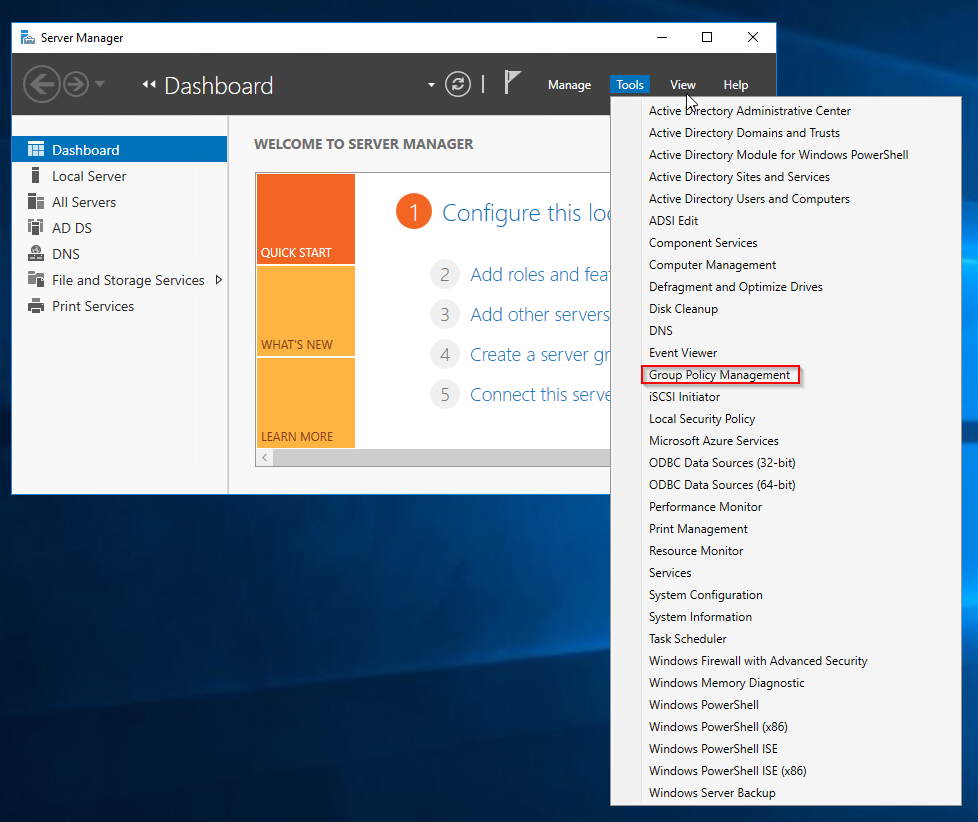
Open Server Manager and click Tools> Group Policy Management.

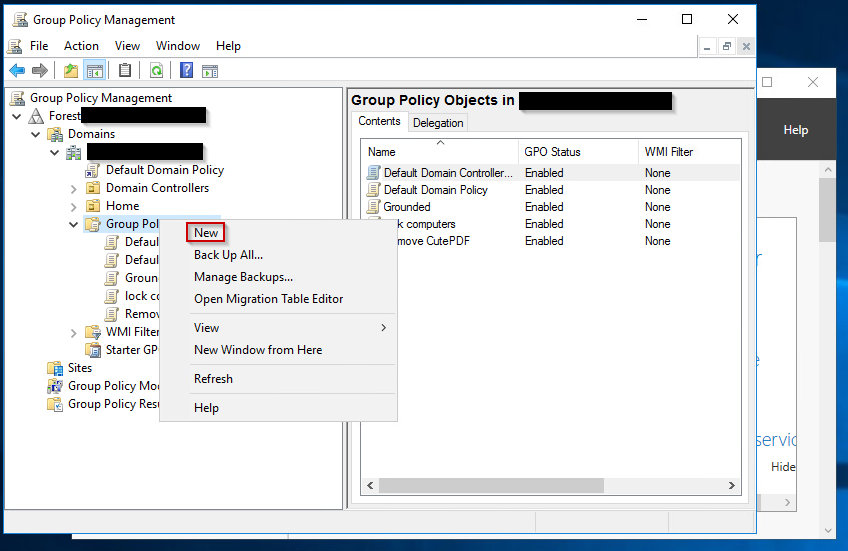
Right click on Group Policy Objects and click New.

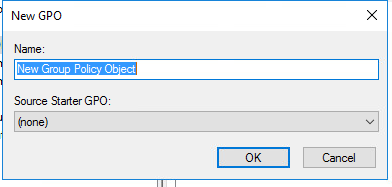
Give it a name like Restrict admin access and click on.

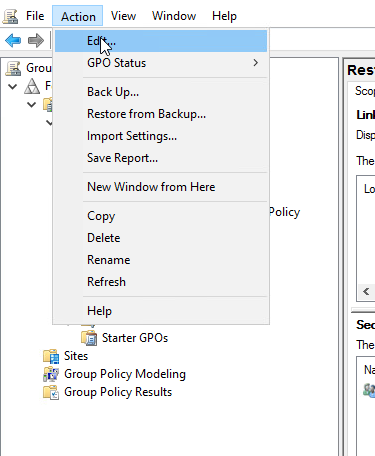
Highlight your new GPO and click Action > Edit.

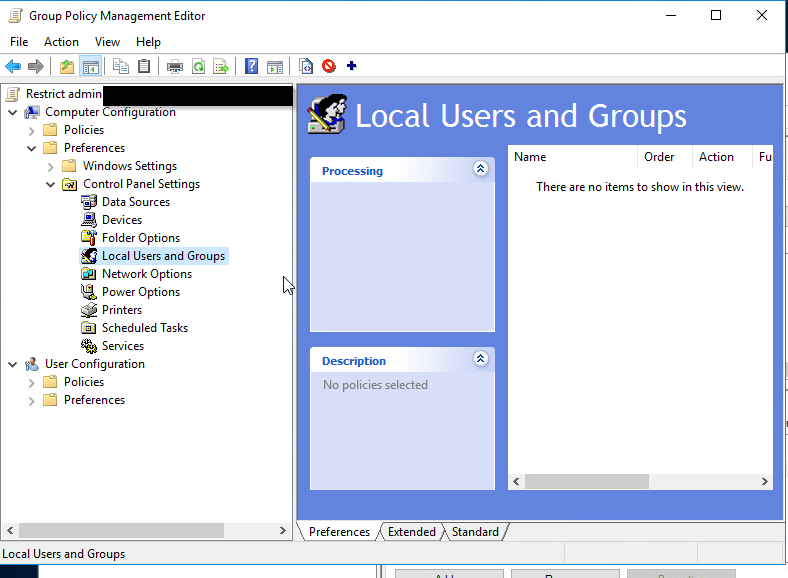
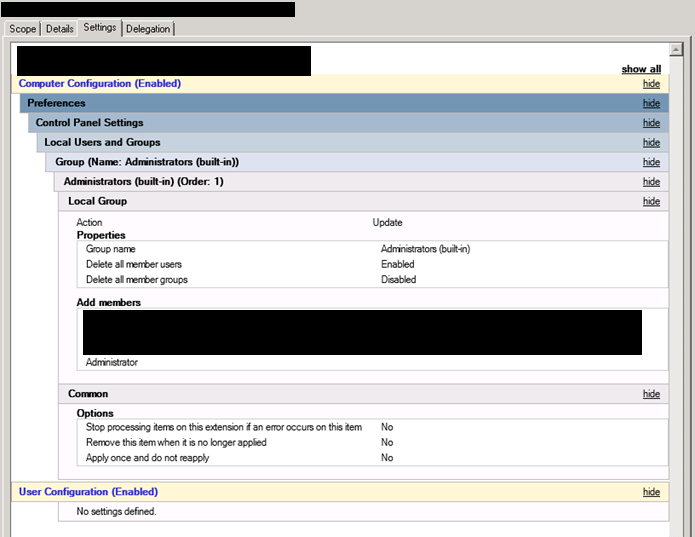
To configure this policy, go to Computer Configuration > Preferences > Control Panel Settings > Right click on Local Users and Groups and Select New > Local Group. Now hit OK.

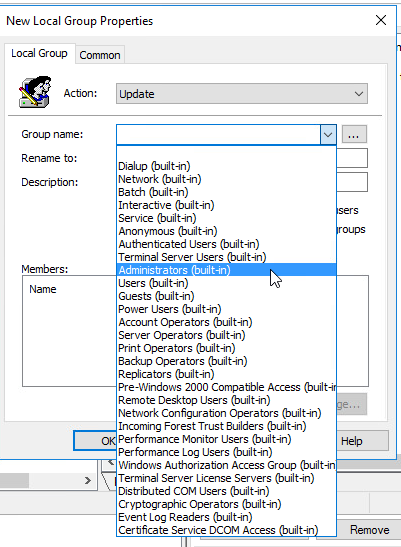
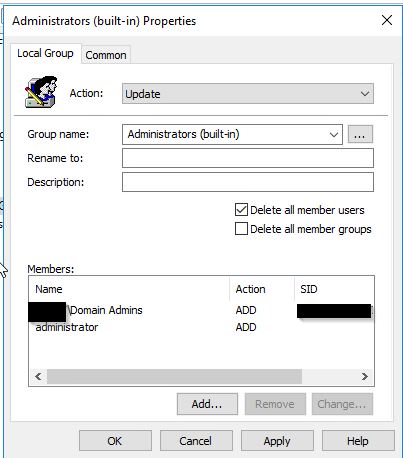
In the Group Name Field there is a drop down, choose the “Administrators (built-in)” group. Check the box that says Delete all member users. Click the add button. Add Domain Admins and any other users or groups you would like to still be an admin. WARNING: it is imperative that correctly configure these members or you can lose admin access to anything this is applied to.

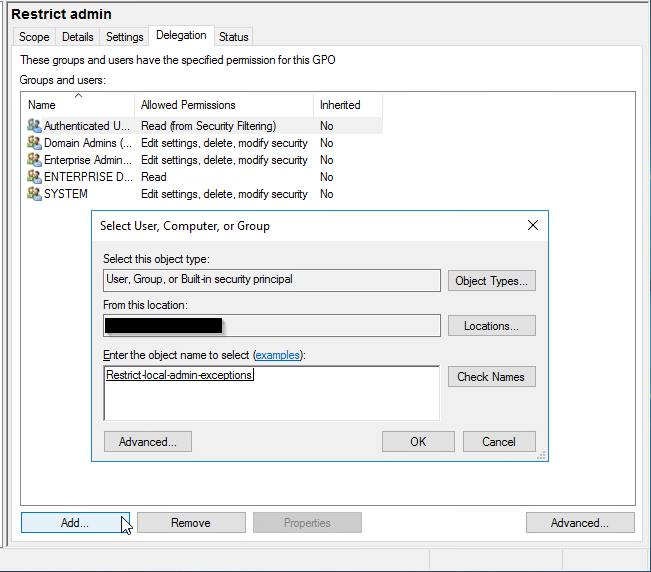
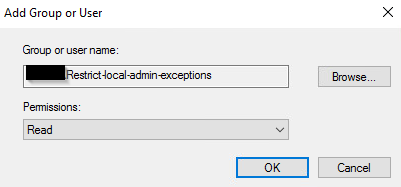
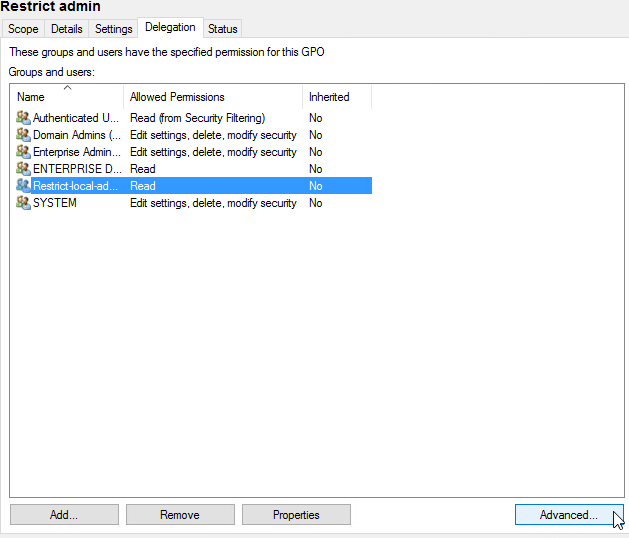
Next we go back to our GPO and click Delegation at the bottom click Add. Now add your freshly made security group and click OK.

In the next window, click OK don’t worry about the settings yet, we are going to change the permissions in the next step.

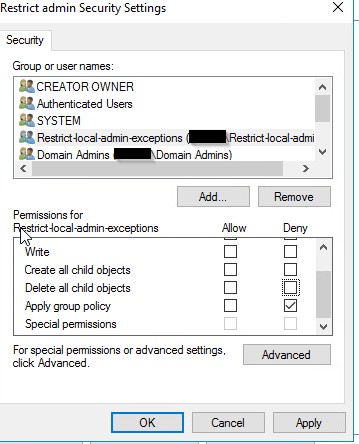
Next we are going to edit the permissions click on the security group then click Advanced in the bottom right corner.

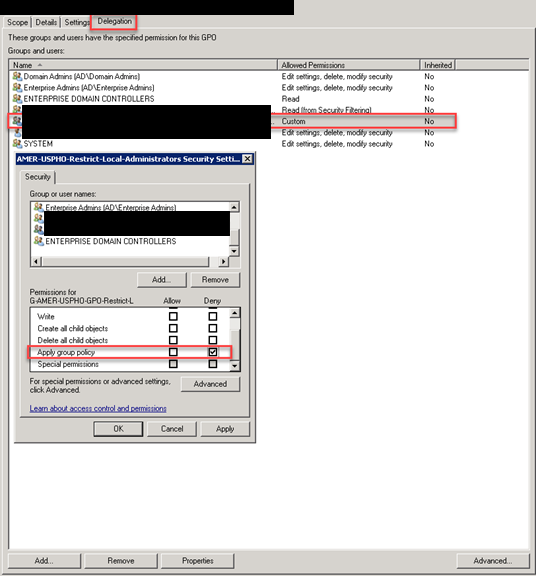
Now click on our security group we made, and click deny under Apply group policy. This is the only thing you want to Deny. Click OK. You are now done creating the GPO.

Once the GPO is linked, all users (and potentially all groups) not specified in the policy will be removed from the “Administrators (built-in)” group on any computer to which the policy is applied.

Exceptions to the policy can be made, such as allowing an AD account to remain in the “Administrators (built-in)” group or creating an account local to that computer. To do this, prevent the application of the Group Policy to that computer by placing the computer object into a security group for such exceptions. This will deny the ability to apply the settings contained in the Group Policy to that computer.

Managing exceptions then becomes an exercise in simply adding or removing computers from the security group set up to hold the machines where an exception is desired and then using GPUPDATE or allowing the GPOs to refresh.

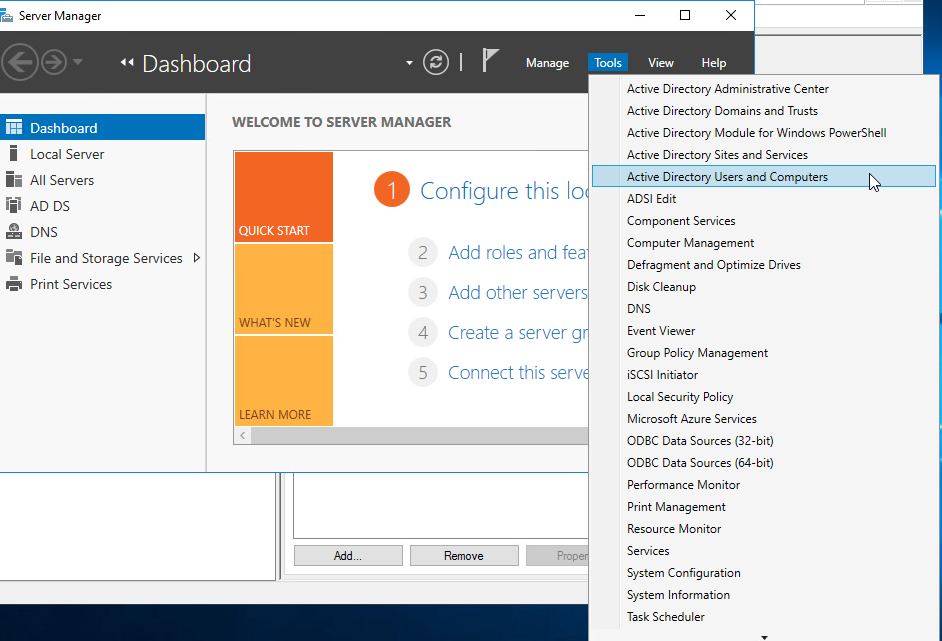
Create a security group for exceptions. Open Server Manager and click Tools > Active Directory Users and Computers.

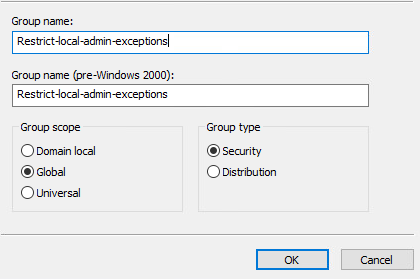
In the navigation pane select the contain in which you want to store the group. For the name of the group you should refer to this as the Admin Exceptions. For the description, Computers in this group will not receive the GPO that removes admin accounts. In the Group scope the selection depends on your Active Directory forest structure. If all of the members are from the same domain, then use Global. In the group type section, click security, then click OK.

It’s important to note that exceptions are applied upon the computer object, not on the user object for the user being granted an exception.

The net effect is that this becomes, in essence, a “Deny All” type approach. Member AD and local accounts not listed in the policy will be stripped from the group each time the policy is applied, unless the computer is a member of the “exceptions” security group. This allows for a standardized and somewhat “set and forget” model for enforcement on computers where no exception is required.

Enforcement Strategy/Plan

While the initial setup of the Group Policy objects and “exceptions” security group might take some effort, once configured it will require little in the way of maintenance.

Auditing and Monitoring

While the Group Policy method of restricting membership in the local “Administrators (built-in)” group offers no immediate auditing or monitoring abilities, there are ways to create those mechanisms via native tools such as PowerShell or potentially use tools such as Alert Logic to provide those capabilities.

For example, since exceptions are granted based upon membership in a security group, it would be possible to dump a list of the members of these groups and compare them against a list of machines where an exception has been granted. Similarly, reports can be run against machines where exceptions have been permitted to ensure that only the authorized accounts have been added to the “Administrators (built-in)” group.

Thank you for reading and if you have any questions please comment below.

PoshPatch

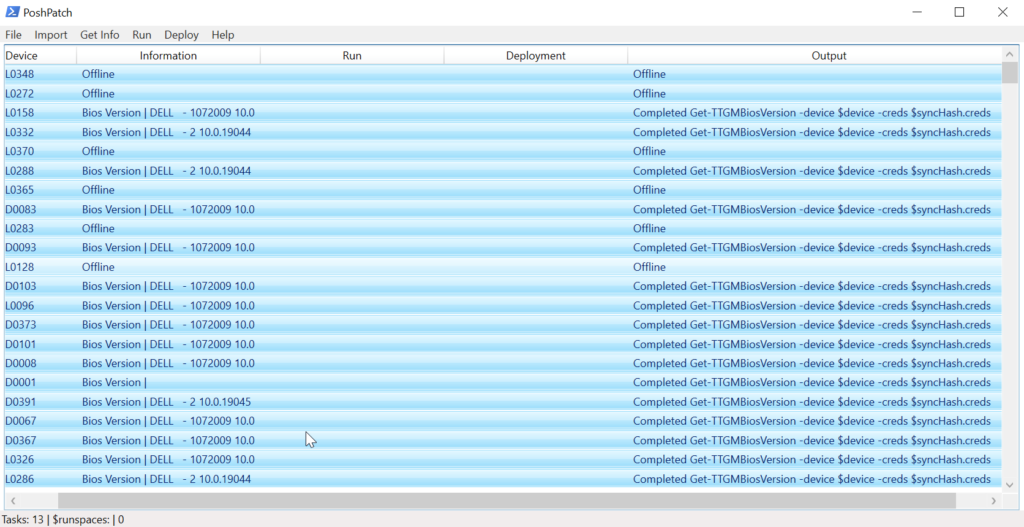
I’m excited to share with you about the application I created in PowerShell called PoshPatch. As system administrator, I found myself constantly managing and administering Windows computers. I knew there had to be a more efficient and user-friendly way to handle patch management, so I decided to create my own tool.

The first step in creating PoshPatch was deciding what features I needed. I wanted a tool that would allow me to easily perform actions on multiple machines, such as installing updates and executing scripts. I also wanted to be able to export the gathered data and run PowerShell commands on multiple machines simultaneously.

Once I had a clear idea of what I wanted, I began working on the application itself. I decided to use PowerShell with a graphical user interface (GUI) to make it as user-friendly as possible. The result was a lightweight PS1 file that could be launched without any installation process.

To make the tool as efficient as possible, I included a menu with Get and Run options, so I could easily execute patch-related tasks. I also made it possible to load a list of computer names or IP addresses and easily select one or multiple hosts from the grid to perform actions on.

As I was working on the application, I ran into some challenges. One of the biggest challenges was figuring out how to make it as versatile as possible without making it too complicated to use. I spent a lot of time fine-tuning the user interface and ensuring that the application was intuitive and user-friendly.

Despite the challenges, I’m proud of what I was able to accomplish with PoshPatch. The application is not only powerful and versatile, but it’s also completely free to use. Anyone can download it and start using it to streamline their patch management workflow.

Overall, I’m excited to share PoshPatch with other IT professionals and system administrators. I believe it’s a must-have tool for anyone who needs to manage a large number of Windows machines. It’s the perfect tool for simplifying patch management and making it easier to stay informed about your system’s status.

Log4jSherlock

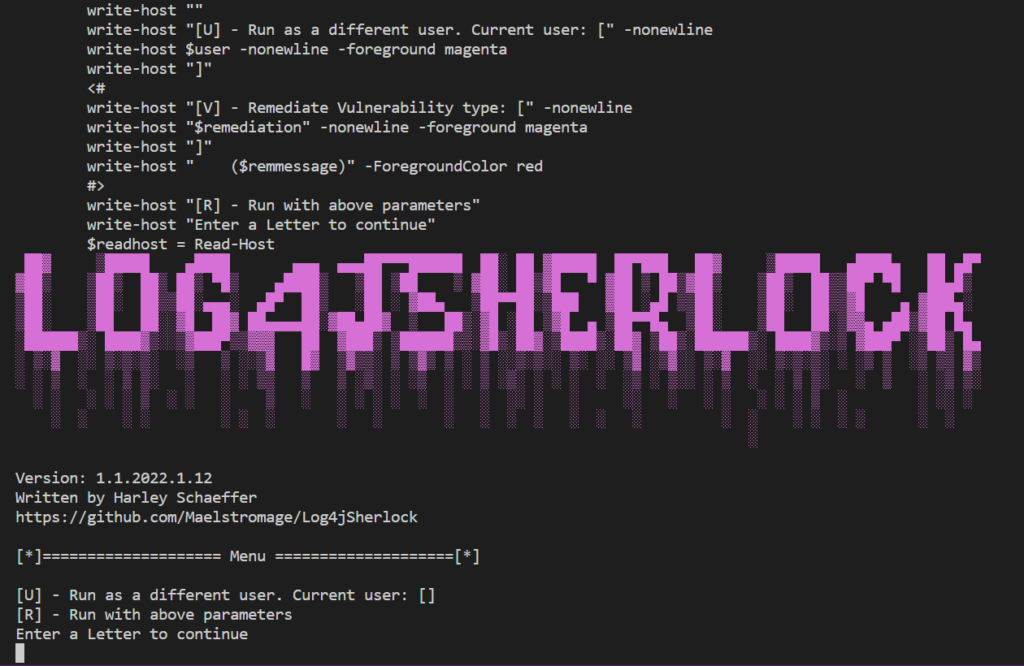
Hello everyone! I want to share with you about my weekend project called Log4Sherlock. I wrote this application to detect CVEs in Log4j scanner, a tool that scans for JAR, WAR, EAR, JPI, HPI that contain the affected JndiLookup.class even in nested files. Log4Sherlock works by scanning all local drives on a system it is run on and grabs pom.properties inside one of the above file types, even in nested files (to obtain the version number). It then searches within the JAR file for JndiLookup.class even in nested files. Files containing JndiLookup.class with vulnerable versions are marked with appropriate CVE and the logs are saved in CSV, JSON, and txt log.

Log4Sherlock was developed to scan for the following CVEs: CVE-2021-44228 Apache Log4j2 2.0-beta9 through 2.12.1 and 2.13.0 through 2.15.0 JNDI, CVE-2021-45046 Apache Log4j 2.15.0, and CVE-2021-45105 Apache Log4j2 versions 2.0-alpha1 through 2.16.0.

One of the reasons why I decided to write this tool was because I noticed that some other scanners did not consider some important points that would let some of these vulnerable files through the cracks. For example, some scanners only scan for JAR files or scan for hashed jar files which doesn’t account for nested files. However, Log4Sherlock scans JAR, WAR, EAR, JPI, HPI, checks nested files, and does not unzip files, just loads them into memory and checks them, making the scanner fast and accurate.

The core value of Log4Sherlock is that it scans multiple computers remotely and uses remote systems resources to make scanning fast. It also does not hash the JAR as it could be nested or edited. Log4Sherlock identifies the following vulnerabilities CVE-2021-44228, CVE-2021-45046, CVE-2021-45105, and searches all drives on the system, excluding mapped drives. It creates a CSV list of affected files and locations and a JSON file with all information including errors like access issues to folders (so you know spots that might have been missed).

To use Log4Sherlock, download the ps1 file from log4jSherlock.ps1 and create the file computers.txt. Fill computers.txt with hostnames and run ps1. You can visit https://github.com/Maelstromage/Log4jSherlock for the complete repository.

Overall, Log4Sherlock is a fast and accurate scanner that can help you detect CVEs in Log4j scanner. I hope this tool can be useful to you and thank you for taking the time to read about it.

A monitoring tool: Fun with Powershell, SQL and Graphana

I set up a custom monitoring solution for my network devices using Grafana and a PowerShell script that inserts ping test results into a MariaDB database. I was using PowerShell soley by itself with a console output to monitor my switches. I wanted a better way to monitor my network devices that was more visual, and this setup seems like it could be just what I need.

The first step in setting up the solution was creating a MariaDB database to store the ping test results. I was not very familiar with databases, but a previous project got me excited about SQL so it took a bit of time, but I got it set up. Now I am able to set up efficient database according to best practices. Once I had the database created, I modified my original script. I modified it to insert the ping test results into a table called “ping_log”. The script runs continuously, inserting ping test results into the database every 5 seconds.

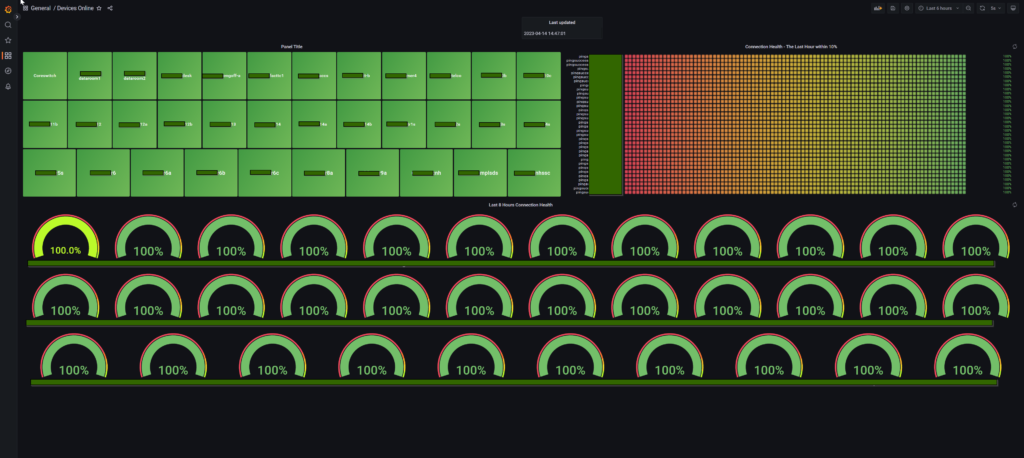
With the ping test results stored in the database, I set up Grafana to create custom dashboards that display real-time or historical ping results for the devices that are being monitored. By connecting Grafana to the same MariaDB database that the PowerShell script is writing to, I was able to create SQL queries that retrieve data from the “ping_log” table and display it in a variety of visualizations, such as line charts or bar graphs.

I’m excited about the potential of this setup. I like how customizable it is, and I can adjust the frequency of the ping tests by changing the timedelay parameter in the PowerShell script. Plus, I can create custom SQL queries in Grafana to retrieve specific data from the “ping_log” table, which will be really helpful when I need to troubleshoot issues with my network devices.

Overall, I feel like I’ve made some good progress. This setup looks great and it is very exciting to see this running along side Prometheus.

Graphana & Prometheus

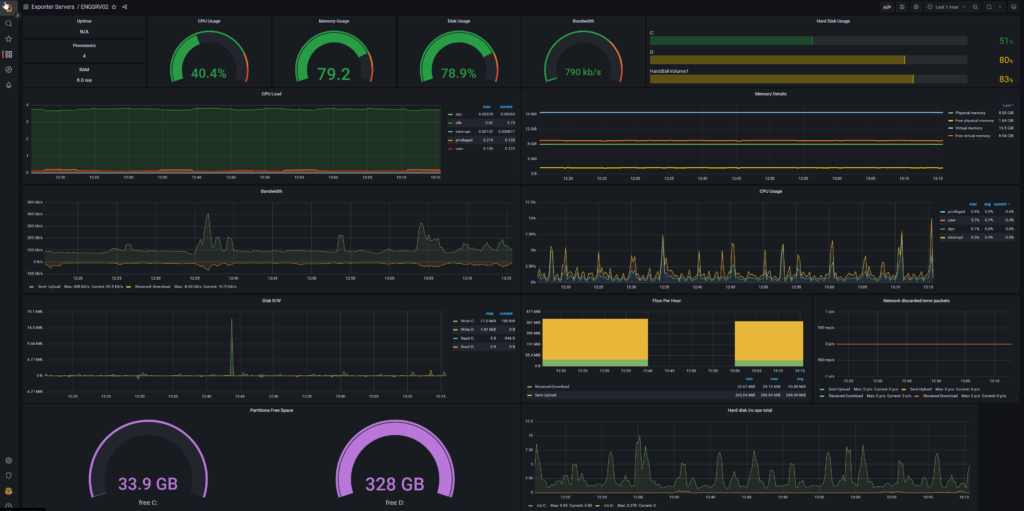
I’m excited to share with you my experience with using Graphana and Prometheus together. As a systems administrator, I’ve found this combination to be incredibly powerful for monitoring and visualizing metrics in real-time.

First off, let’s talk about what these two tools are. Prometheus is a monitoring and alerting toolkit that collects metrics from different sources and stores them in a time-series database. Grafana is a data visualization tool that allows you to create customizable dashboards and graphs from the data stored in Prometheus.

What is really great is the ability to create real-time dashboards that update automatically as new data comes in. This can be incredibly useful for monitoring the health of your applications or infrastructure and responding quickly to any issues that arise.

I have this running on a large monitor and it cycles through all the servers. I have already caught a few cpu and hard drive issues. I can also see if something goes down. This is great to stay ahead of any outages before they cause too many issues with production.

It is the flexibility of Grafana’s visualization options that makes it shine. You can create a wide range of visualizations, including graphs, tables, and even maps. This makes it easy to create custom dashboards that are tailored to your specific needs.

From a technical perspective, Prometheus uses a pull-based model to collect metrics, which means that it periodically scrapes targets for data. This is different from some other monitoring tools that use a push-based model, where the targets send data to the monitoring tool. The advantage of the pull-based model is that it’s more flexible and allows you to collect metrics from a wider range of sources, and who really wants to have another agent in your environment.

This one of my favorite things I have set up. I would highly recommend this free solution to all of my fellow system administrators out there.
© 2026 Harley Schaeffer

Theme by Anders NorenUp ↑